Kubernetes Autoscaling Explained: HPA vs VPA vs Karpenter vs KEDA
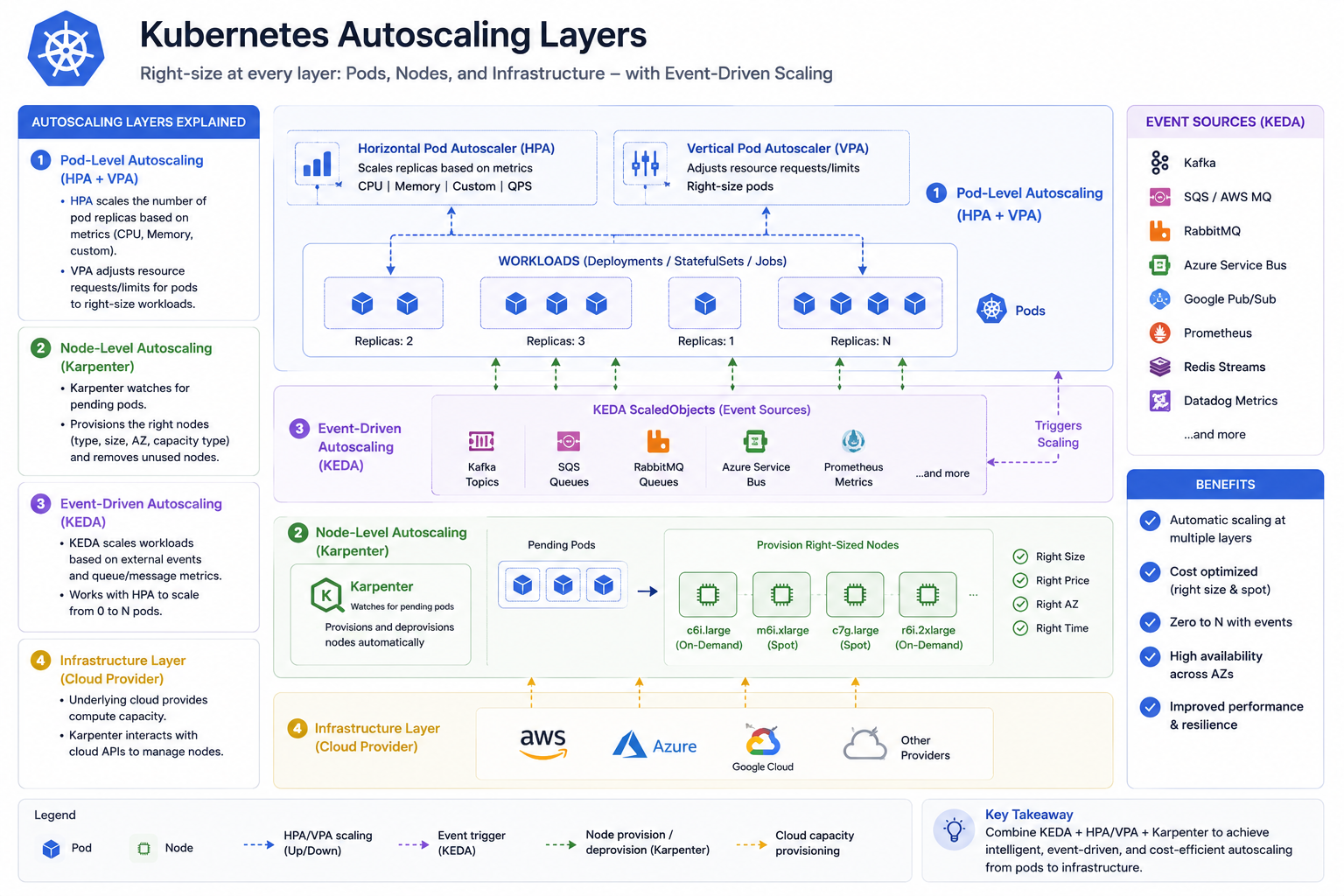
Four autoscalers, four different jobs, and one very common failure: teams install two that fight each other. Kubernetes autoscaling isn't one feature — it's a stack of independent controllers operating at different layers. Getting the combination right is what separates a cluster that absorbs a traffic spike from one that throttles or overspends through it.
Short answer: HPA scales the number of pods, VPA scales the size of a pod, Karpenter scales the nodes underneath, KEDA scales pods on external signals like queue depth. The standard production stack is HPA + Karpenter, with KEDA added for queue workers and VPA used in recommendation mode only. Never run HPA and VPA on the same CPU metric for the same workload.
Book a free 30-min Kubernetes scaling review →
What Does Each Kubernetes Autoscaler Actually Scale?
- HPA (Horizontal Pod Autoscaler) — changes replica count based on metrics. Built into Kubernetes. The default answer for stateless HTTP services.
- VPA (Vertical Pod Autoscaler) — changes CPU and memory requests of individual pods. Historically requires a pod restart to apply; in-place resizing is arriving but still maturing.
- Karpenter (or Cluster Autoscaler) — adds and removes nodes. Without this, HPA hits a wall: pods sit
Pendingbecause no node has room. - KEDA — HPA driven by external event sources: SQS queue length, Kafka lag, Redis list length, Prometheus queries, cron schedules. Scales to zero, which HPA alone cannot do.
The layer model makes the interaction obvious: KEDA and HPA decide how many pods, VPA decides how big each pod is, Karpenter decides what hardware exists to hold them.
How Do I Configure HPA Properly?
Two things break most HPA setups: scaling on the wrong metric, and default behaviour that flaps.
CPU is the default metric and it's frequently wrong. A service waiting on a database is slow at 20% CPU — CPU-based HPA will never scale it. Scale on the signal that reflects your actual saturation: requests per second, in-flight concurrency, or p95 latency.
apiVersion: autoscaling/v2
kind: HorizontalPodAutoscaler
metadata:
  name: api
spec:
  scaleTargetRef:
    apiVersion: apps/v1
    kind: Deployment
    name: api
  minReplicas: 3
  maxReplicas: 30
  metrics:
    - type: Pods
      pods:
        metric:
          name: http_requests_per_second   # via prometheus-adapter
        target:
          type: AverageValue
          averageValue: "50"
  behavior:
    scaleUp:
      stabilizationWindowSeconds: 0        # react immediately
      policies:
        - type: Percent
          value: 100                       # can double pod count
          periodSeconds: 30
    scaleDown:
      stabilizationWindowSeconds: 300      # wait 5 min before shrinking
      policies:
        - type: Percent
          value: 25
          periodSeconds: 60
The asymmetric behavior block is the important part: scale up fast, scale down slowly. Scaling up late costs you a latency incident; scaling down late costs a few minutes of compute. The default 300-second scale-down window is right; the aggressive scale-up policy is what you have to add.
Also: minReplicas: 1 means a single node drain takes your service offline. Three is the sane floor for anything user-facing.
Should I Use VPA in Production?
In recommendation mode: yes, genuinely useful. In auto mode: rarely, and never alongside HPA on the same resource metric.
The conflict is mechanical. HPA adds replicas when CPU utilisation against requests is high. VPA raises requests when usage is high. Raising requests lowers measured utilisation, so HPA scales back down, so per-pod load rises, so VPA raises requests again. The two controllers oscillate, and pods restart on every VPA change.
apiVersion: autoscaling.k8s.io/v1
kind: VerticalPodAutoscaler
metadata:
  name: api-vpa
spec:
  targetRef:
    apiVersion: apps/v1
    kind: Deployment
    name: api
  updatePolicy:
    updateMode: "Off"        # recommend only, change nothing
  resourcePolicy:
    containerPolicies:
      - containerName: api
        minAllowed: { cpu: 100m, memory: 128Mi }
        maxAllowed: { cpu: "2", memory: 4Gi }
# Read the recommendation, then apply it deliberately via your manifests
kubectl describe vpa api-vpa | grep -A 10 "Recommendation"Treating VPA as an advisor that feeds your Helm values — reviewed monthly — gives you the rightsizing benefit without restart churn. Auto mode is reasonable for single-replica batch jobs and internal tooling where a restart is harmless.
When Do I Need KEDA Instead of HPA?
Whenever the thing determining required capacity isn't visible in pod metrics. The canonical case is a queue worker: 10,000 messages waiting in SQS while workers sit at 30% CPU. HPA sees a healthy service. KEDA sees a backlog.
apiVersion: keda.sh/v1alpha1
kind: ScaledObject
metadata:
  name: worker
spec:
  scaleTargetRef:
    name: worker
  minReplicaCount: 0          # scale to zero when the queue is empty
  maxReplicaCount: 50
  pollingInterval: 15
  cooldownPeriod: 120
  triggers:
    - type: aws-sqs-queue
      metadata:
        queueURL: https://sqs.eu-central-1.amazonaws.com/111122223333/jobs
        queueLength: "20"      # target ~20 messages per pod
        awsRegion: eu-central-1
      authenticationRef:
        name: keda-aws-creds
minReplicaCount: 0 is the feature HPA can't give you, and for spiky batch workloads it's often the largest available saving — idle workers cost nothing. Scale-from-zero does add cold-start latency (scheduling plus image pull plus app boot), so keep it for asynchronous work rather than request paths.
How Do Pod and Node Autoscaling Work Together?
HPA without node autoscaling just converts load into Pending pods. Karpenter closes the loop: it watches for unschedulable pods and provisions a node that fits them, usually in 40–60 seconds.
Two techniques make the combination feel fast rather than laggy.
Headroom via pause pods. Keep a low-priority placeholder holding spare capacity. When real pods need room, the placeholder is preempted instantly and Karpenter replaces the capacity in the background. You trade a little steady-state cost for near-zero scheduling delay on a spike.
apiVersion: scheduling.k8s.io/v1
kind: PriorityClass
metadata:
  name: headroom
value: -10                    # lower than default, always preempted first
globalDefault: false
---
apiVersion: apps/v1
kind: Deployment
metadata:
  name: headroom
spec:
  replicas: 2
  selector: { matchLabels: { app: headroom } }
  template:
    metadata:
      labels: { app: headroom }
    spec:
      priorityClassName: headroom
      terminationGracePeriodSeconds: 0
      containers:
        - name: pause
          image: registry.k8s.io/pause:3.9
          resources:
            requests: { cpu: "2", memory: 4Gi }
Disruption controls, so consolidation doesn't fight your availability targets. Karpenter's consolidation is what makes it cost-effective; PodDisruptionBudgets plus a maintenance window are what keep it safe.
spec:
  disruption:
    consolidationPolicy: WhenEmptyOrUnderutilized
    consolidateAfter: 1m
    budgets:
      - nodes: "10%"                     # never disrupt more than 10% at once
      - schedule: "0 9 * * mon-fri"      # no voluntary disruption in business hours
        duration: 9h
        nodes: "0"
What Does a Correct Autoscaling Stack Look Like?
The configuration I deploy on production clusters:
- Karpenter for nodes, Spot-first with an On-Demand fallback, consolidation on, disruption budgets set.
- HPA v2 on every user-facing deployment, scaling on a saturation metric (RPS or concurrency),
minReplicas: 3, fast up and slow down. - KEDA for every queue consumer and cron-shaped workload, scaling to zero where latency permits.
- VPA in
updateMode: "Off"across the cluster as a rightsizing advisor. - PDBs and topology spread on everything, because autoscaling means constant pod movement.
- Requests set from real p95 usage — every autoscaler above reasons about requests, so wrong requests make every layer wrong.
That last point undoes most autoscaling projects. Autoscaling amplifies whatever your resource requests claim. If the requests are fiction, you'll scale confidently in the wrong direction.
Make Scaling Boring
A well-tuned autoscaling stack is invisible: traffic triples, latency stays flat, the bill rises briefly and comes back down. Getting there is mostly about picking the right metric per workload and letting each controller own exactly one layer.
Learn more about the AWS Architecture Review →
Book a free 30-min Kubernetes scaling review →