EKS Cost Optimization: How to Cut a Kubernetes Bill by 60% Without Touching Your App
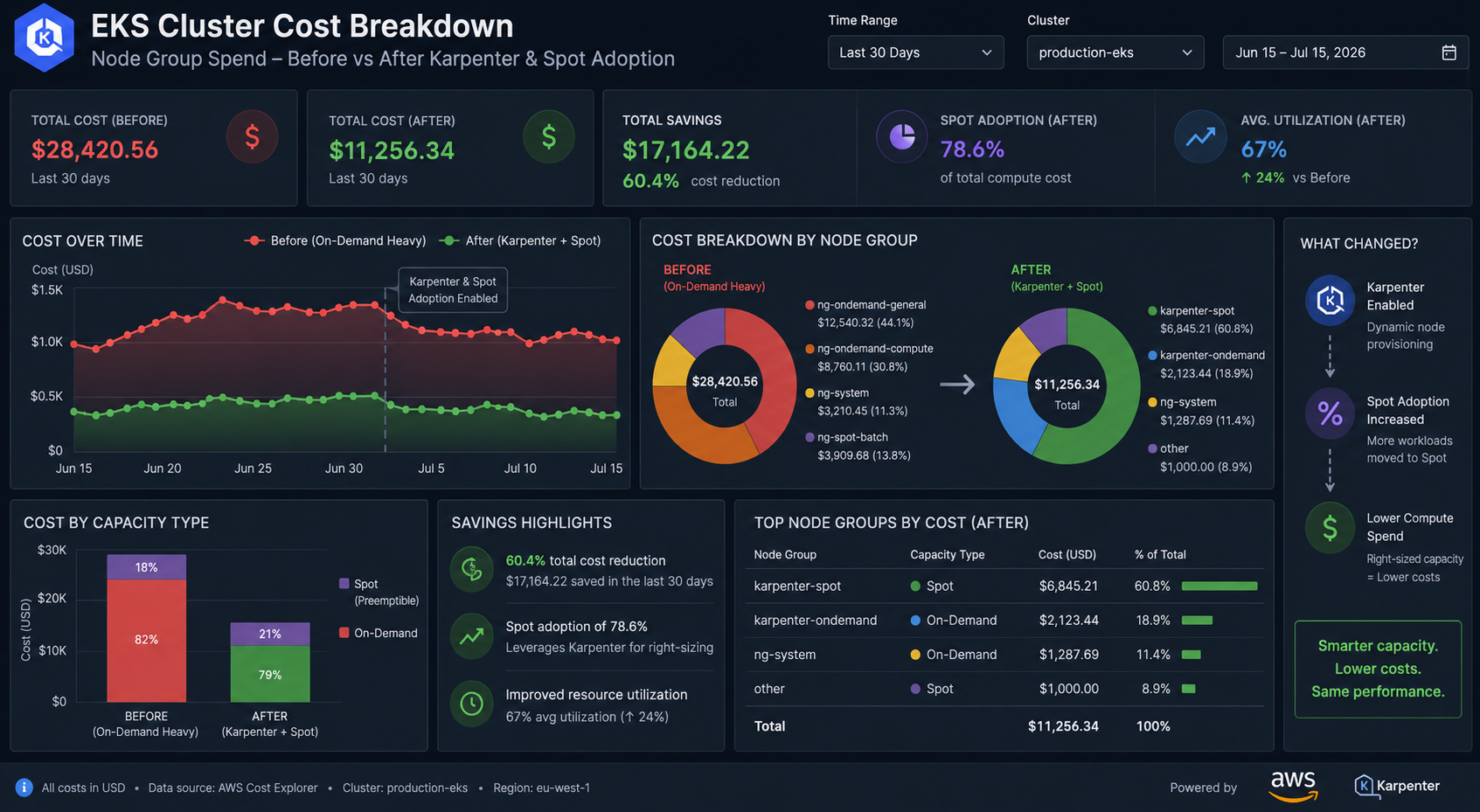
Most EKS clusters I audit run at 20–35% CPU utilisation and pay full On-Demand price for the other 65%. That's the whole story of Kubernetes cost: you don't pay for what your pods use, you pay for the nodes you asked for. Close the gap between requests and reality and the bill drops without a single application change.
Short answer: four levers, in this order — (1) rightsize pod requests using real usage data, (2) replace managed node groups with Karpenter so nodes match the pods that actually exist, (3) move stateless workloads to Spot, (4) delete the idle resources nobody owns. On a typical $18k/month EKS estate, that sequence lands between 40% and 60% savings in two to three weeks.
Book a free 30-min Kubernetes cost review →
Why Is My EKS Bill So High When Utilisation Is Low?
Because the scheduler is doing exactly what you told it to. A pod requesting 2 CPU and 4Gi reserves that capacity on a node whether it uses it or not. Ten over-requested pods can pin a whole m5.2xlarge that averages 15% real usage.
Start by measuring the gap. If you have metrics-server and Prometheus, this is the most useful comparison you can run today:
# What pods actually use right now
kubectl top pods --all-namespaces --sort-by=cpu

# What they reserved
kubectl get pods --all-namespaces -o custom-columns=\
NS:.metadata.namespace,POD:.metadata.name,\
CPU_REQ:.spec.containers[*].resources.requests.cpu,\
MEM_REQ:.spec.containers[*].resources.requests.memory
For a 14-day view rather than a snapshot, run KRR against your Prometheus:
krr simple --clusterName prod --prometheus-url http://prometheus:9090
Typical finding in a startup cluster: aggregate CPU requests of 180 cores against a 95th-percentile actual usage of 48 cores. You are buying 3.7x the compute you need.
How Do I Rightsize Kubernetes Requests Safely?
The rule I use on production clusters: set CPU requests at the p95 of real usage with no CPU limit; set memory requests at the 14-day max plus 15%, and set the memory limit equal to the request.
The asymmetry matters, and it's where most teams get burned:
- CPU is compressible. Exceeding your CPU request means throttling, not death. A CPU limit is usually harmful — it throttles bursty workloads (JVM startup, Node.js event loop spikes) even when the node has idle cores.
- Memory is not compressible. Exceeding a memory limit is an instant OOMKill. Request equal to limit gives you Guaranteed QoS, which means the kubelet evicts your pod last under node pressure.
resources:
  requests:
    cpu: "250m"      # p95 of real usage
    memory: "512Mi"  # 14-day max + 15%
  limits:
    memory: "512Mi"  # equal to request -> Guaranteed QoS
    # deliberately no cpu limit
Roll this out namespace by namespace, watching throttling metrics (container_cpu_cfs_throttled_seconds_total) and restart counts for 48 hours before moving on. Rightsizing alone commonly recovers 25–30%, because it lets the cluster pack more pods per node and delete the surplus.
Should I Use Karpenter Instead of Managed Node Groups?
Yes, for almost every workload except tightly regulated fixed-capacity clusters. Managed node groups plus Cluster Autoscaler force you to pre-decide instance types. You end up with three or four node groups sized for your worst-case pod, and every node group carries its own slack.
Karpenter inverts this: it looks at pending pods and provisions the cheapest instance that fits from a wide family list, then consolidates nodes as pods churn.
apiVersion: karpenter.sh/v1
kind: NodePool
metadata:
  name: default
spec:
  template:
    spec:
      requirements:
        - key: karpenter.sh/capacity-type
          operator: In
          values: ["spot", "on-demand"]
        - key: kubernetes.io/arch
          operator: In
          values: ["amd64", "arm64"]
        - key: karpenter.k8s.aws/instance-category
          operator: In
          values: ["c", "m", "r"]
        - key: karpenter.k8s.aws/instance-generation
          operator: Gt
          values: ["5"]
      nodeClassRef:
        group: karpenter.k8s.aws
        kind: EC2NodeClass
        name: default
  disruption:
    consolidationPolicy: WhenEmptyOrUnderutilized
    consolidateAfter: 30s
  limits:
    cpu: 400
Two details produce most of the savings: consolidationPolicy: WhenEmptyOrUnderutilized actively bin-packs and terminates half-empty nodes, and including arm64 lets Karpenter pick Graviton instances, roughly 20% cheaper per unit of compute. If your images are multi-arch, that is free money.
Is Spot Safe for Production Kubernetes Workloads?
For stateless workloads with more than two replicas: yes, and it's the biggest single lever — 60–70% off On-Demand. Spot interruptions come with a two-minute warning that Karpenter consumes automatically, cordoning and draining the node before reclamation.
What you must have in place first:
- PodDisruptionBudgets on every deployment, or a drain can take your whole service down at once.
- Topology spread across zones and nodes, so a single Spot pool reclamation doesn't hit every replica.
- Graceful shutdown — handle SIGTERM, finish in-flight requests, keep
terminationGracePeriodSecondsunder 120.
apiVersion: policy/v1
kind: PodDisruptionBudget
metadata:
  name: api
spec:
  minAvailable: 75%
  selector:
    matchLabels:
      app: api
---
# in the Deployment pod spec
topologySpreadConstraints:
  - maxSkew: 1
    topologyKey: topology.kubernetes.io/zone
    whenUnsatisfiable: ScheduleAnyway
    labelSelector:
      matchLabels:
        app: api
Keep on On-Demand: single-replica stateful services, databases, anything holding a long-lived lease, and ingress controllers unless you run at least three. A practical split is Spot for application workloads plus a small tainted On-Demand NodePool for the control-plane-adjacent components.
What Idle EKS Spend Do Teams Always Miss?
Five recurring items, all pure waste:
- Orphaned EBS volumes. Deleted StatefulSets leave PVCs with a
Retainreclaim policy behind. I've found $900/month of unattached gp2 in a single account. - NAT Gateway per AZ plus chatty cross-AZ traffic. Cross-AZ data transfer inside a cluster is billable. Use topology-aware routing for internal services.
- Old ECR images. No lifecycle policy means every CI build is stored forever.
- Dev and staging clusters running 24/7 for a team working 40 hours a week — 76% waste on non-prod.
- gp2 volumes. gp3 is cheaper per GB and lets you provision IOPS separately.
# Unattached EBS volumes
aws ec2 describe-volumes --filters Name=status,Values=available \
  --query 'Volumes[].{ID:VolumeId,GB:Size,Type:VolumeType}' --output table

# ECR lifecycle: keep last 20 images per repo
aws ecr put-lifecycle-policy --repository-name my-app \
  --lifecycle-policy-text '{"rules":[{"rulePriority":1,
  "selection":{"tagStatus":"any","countType":"imageCountMoreThan","countNumber":20},
  "action":{"type":"expire"}}]}'
How Do I Keep EKS Costs From Creeping Back?
Every optimisation decays. Without a feedback loop you'll be back to the same numbers in six months, because new services ship with resource requests copy-pasted from the largest existing deployment.
The minimum durable setup: OpenCost or Kubecost in-cluster for per-namespace showback, a monthly KRR run reviewed in the platform team's sprint, AWS Budgets alerts on EKS-tagged spend, and a ResourceQuota per namespace so no team can quietly claim 40 cores.
apiVersion: v1
kind: ResourceQuota
metadata:
  name: team-quota
  namespace: team-payments
spec:
  hard:
    requests.cpu: "24"
    requests.memory: 48Gi
    persistentvolumeclaims: "10"
Cost per namespace, visible to the team that owns the namespace, changes behaviour faster than any policy document.
Get Your Kubernetes Spend Under Control
The pattern is consistent across every cluster I've audited: the money isn't lost in exotic places, it's lost in requests nobody revisited and nodes nobody rightsized. Two weeks of focused work is usually worth six figures a year at mid-size scale.
Learn more about the cloud cost optimization engagement →
Book a free 30-min Kubernetes cost review →