How to Reduce Docker Image Size: From 1.2GB to 90MB Without Breaking Anything
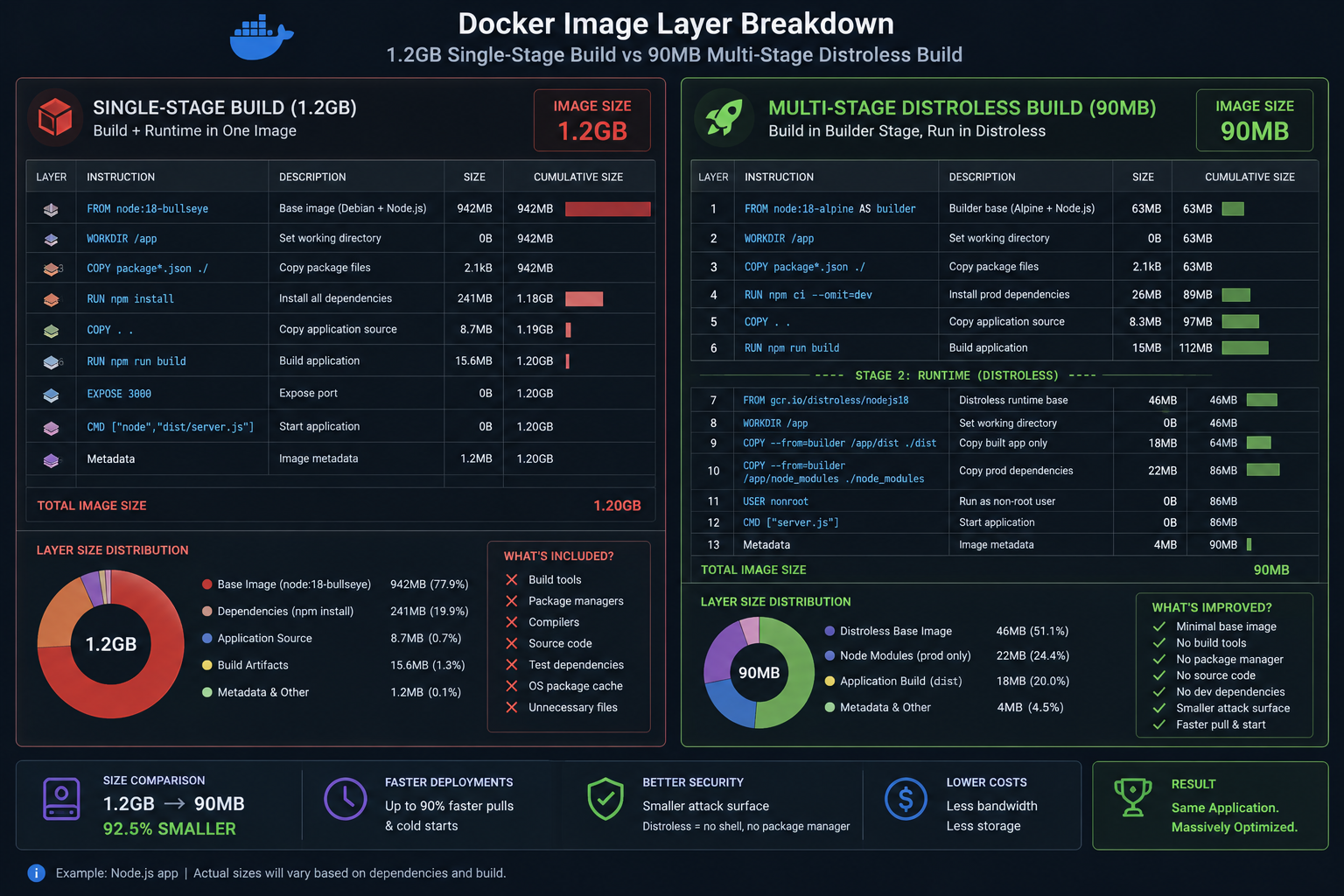
A 1.2GB application image isn't just slow to pull — it's a security surface, a CI bottleneck and a cold-start tax on every autoscaling event. Most bloated images get that way from three habits, and all three are fixable in an afternoon without changing a line of application code.
Short answer: use multi-stage builds so compilers and dev headers never reach the final layer, pick a slim or distroless runtime base, and order your Dockerfile so dependency installation caches separately from source copy. Typical results: Python 1.2GB → 180MB, Node 1.1GB → 140MB, Go 800MB → 15MB.
Book a free 30-min container and delivery review →
Why Are My Docker Images So Large?
Three causes, in order of impact:
- Build toolchain shipped to production.
gcc,make, dev headers, npm dev dependencies, test fixtures — all needed to build, none needed to run. - A full OS base image.
python:3.12is around 1GB before your code.python:3.12-slimis around 130MB. Same Python. - Layer accumulation. Deleting files in a later
RUNdoesn't shrink the image — the bytes still exist in the earlier layer. Deletion must happen in the same layer as creation.
Diagnose before optimising. Layer-level visibility shows exactly which instruction is expensive:
docker history myapp:latest --human --format "{{.Size}}\t{{.CreatedBy}}"

# Better: interactive layer explorer with wasted-space analysis
dive myapp:latest
How Do Multi-Stage Builds Cut Image Size?
You build in one stage with the full toolchain, then copy only the artefacts into a clean final stage. Everything else is discarded.
Python — before (1.2GB):
FROM python:3.12
WORKDIR /app
COPY . .
RUN apt-get update && apt-get install -y gcc libpq-dev
RUN pip install -r requirements.txt
CMD ["gunicorn", "app.wsgi:application", "--bind", "0.0.0.0:8000"]
Python — after (about 180MB):
# ---- build stage ----
FROM python:3.12-slim AS builder
RUN apt-get update && apt-get install -y --no-install-recommends \
        gcc libpq-dev \
    && rm -rf /var/lib/apt/lists/*
WORKDIR /app
COPY requirements.txt .
RUN pip install --no-cache-dir --prefix=/install -r requirements.txt

# ---- runtime stage ----
FROM python:3.12-slim
RUN apt-get update && apt-get install -y --no-install-recommends libpq5 \
    && rm -rf /var/lib/apt/lists/* \
    && useradd -u 10001 -m appuser
COPY --from=builder /install /usr/local
WORKDIR /app
COPY --chown=appuser:appuser . .
USER appuser
EXPOSE 8000
CMD ["gunicorn", "app.wsgi:application", "--bind", "0.0.0.0:8000"]
Note the details that matter: libpq-dev (build-time headers, around 30MB) is replaced by libpq5 (the runtime library, around 200KB) in the final stage. --no-install-recommends and the apt list cleanup happen in the same RUN. And the container runs as a non-root user, which costs nothing and removes an entire class of escape scenarios.
Go — the extreme case (about 15MB):
FROM golang:1.23 AS builder
WORKDIR /src
COPY go.mod go.sum ./
RUN go mod download
COPY . .
RUN CGO_ENABLED=0 go build -ldflags="-s -w" -o /out/app ./cmd/server

FROM gcr.io/distroless/static-debian12:nonroot
COPY --from=builder /out/app /app
USER nonroot:nonroot
ENTRYPOINT ["/app"]
A statically linked binary on distroless static has no shell, no package manager and no libc — nothing for an attacker to pivot into, and nothing for a CVE scanner to flag.
Should I Use Alpine, Slim, or Distroless?
Practical guidance from production, not benchmarks:
- slim (Debian-based) — the default choice for Python, Node and Ruby. glibc-compatible, so wheels and prebuilt native modules work. Small enough.
- Alpine — smallest general-purpose base, but musl instead of glibc. For Python this means pip often builds packages from source instead of using manylinux wheels: builds get slower, images sometimes get bigger, and you can hit subtle DNS and threading differences. Great for Go and static binaries; frequently a trap for Python.
- distroless — best security posture and smallest runtime for compiled languages, and for Python/Node once dependencies are settled. No shell means no
kubectl execdebugging, so pair it with ephemeral debug containers.
# Debugging a distroless pod without a shell in the image
kubectl debug -it mypod --image=busybox:1.36 --target=app
How Do I Make Docker Builds Faster, Not Just Smaller?
Layer ordering is the whole game: put the things that change rarely first. Copying source before installing dependencies invalidates the dependency cache on every commit — the most common Dockerfile mistake there is.
# WRONG - any source change reinstalls all deps
COPY . .
RUN npm ci

# RIGHT - deps only reinstall when the lockfile changes
COPY package.json package-lock.json ./
RUN npm ci
COPY . .
Then add BuildKit cache mounts, which keep the package manager cache across builds without baking it into the image:
# syntax=docker/dockerfile:1.7
FROM python:3.12-slim AS builder
RUN --mount=type=cache,target=/root/.cache/pip \
    pip install --prefix=/install -r requirements.txt
And a .dockerignore, the highest benefit-to-effort item in this entire article:
.git
.venv
node_modules
__pycache__
*.pyc
.pytest_cache
.env
tests/
*.md
media/
Without it, COPY . . ships your .git history and local virtualenv into the image. I've seen that alone account for 400MB and a leaked .env file.
What Does Image Size Actually Cost in Production?
Concrete numbers from a Kubernetes platform running 40 services:
- Autoscaling latency. Pulling 1.2GB onto a fresh Karpenter node takes 45–90 seconds before your app even starts. At 90MB it's under five seconds. That difference decides whether a traffic spike is absorbed or dropped.
- CI throughput. Every push pushes and pulls that image. Smaller images cut one client's pipeline from 14 minutes to six.
- Registry and transfer cost. ECR storage plus cross-AZ pulls across hundreds of daily deploys is real money at scale.
- Vulnerability noise. A full Debian base reports 200+ CVEs from packages you never invoke. Distroless typically reports single digits — so your security queue contains signal instead of noise.
# Make it a CI gate, not a good intention
trivy image --severity HIGH,CRITICAL --exit-code 1 myapp:$SHA
Fix the Dockerfile, Fix Three Problems at Once
Image size is one of those rare cases where the security win, the cost win and the performance win all come from the same change. If your base images haven't been reviewed in a year, this is the highest-leverage afternoon on your backlog.
Learn more about container and delivery consulting →
Book a free 30-min review →