Terraform State Management Best Practices: How to Avoid the Outage Nobody Talks About
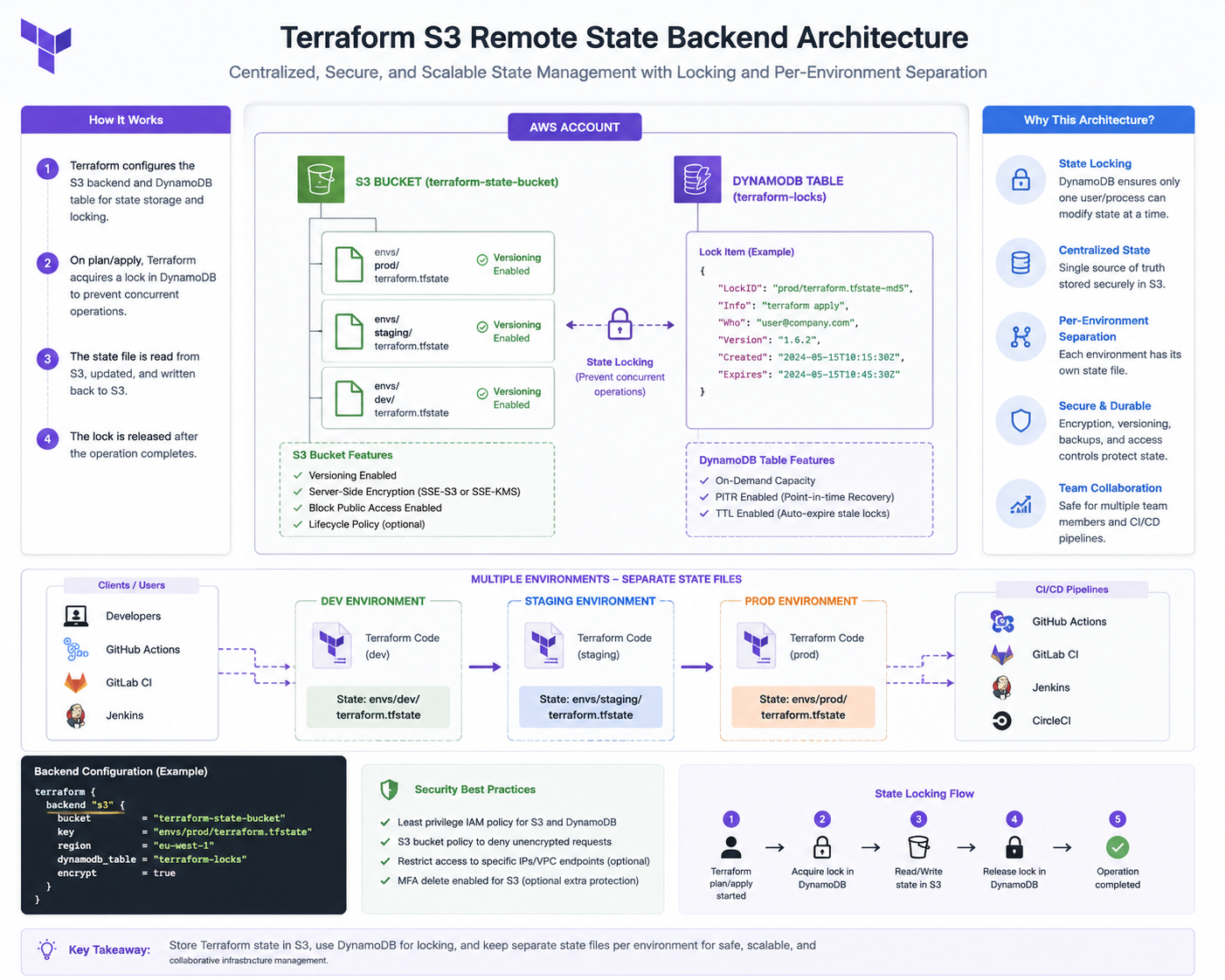
The worst Terraform incidents I've been called into weren't caused by bad HCL — they were caused by state. Two engineers applying at once. A monolithic state file where one typo plans the destruction of a production database. A terraform destroy that ran against the wrong workspace. State handling is the difference between Terraform as a safety net and Terraform as a loaded weapon.
Short answer: remote state in S3 with locking, one state file per environment per layer (not one giant state), no local state ever, and versioning enabled on the state bucket so you can roll back. Set this up on day one — retrofitting it after you have 300 resources is a genuinely risky project.
Book a free 30-min Infrastructure as Code review →
Why Is Local Terraform State Dangerous?
By default Terraform writes terraform.tfstate next to your code. Three failure modes follow immediately:
- No locking. Two engineers applying at the same time produce a state file reflecting neither reality. Terraform then tries to "fix" resources that already exist or, worse, recreates them.
- Secrets on laptops. State stores attribute values in plaintext — RDS passwords, generated keys, secret contents. A local state file in a git repo is a credential leak.
- One laptop becomes the source of truth. Lost machine, lost state, and now you're importing production resource by resource.
The fix is short and there's no reason to delay it:
terraform {
  required_version = "~> 1.9"

  backend "s3" {
    bucket       = "acme-terraform-state"
    key          = "prod/network/terraform.tfstate"
    region       = "eu-central-1"
    encrypt      = true
    use_lockfile = true          # native S3 locking, TF 1.10+
    # dynamodb_table = "terraform-locks"   # for older versions
  }
}
The state bucket itself needs three properties: versioning on (your undo button), default encryption, and public access blocked. Create it once, outside your main Terraform, and never delete it.
aws s3api create-bucket --bucket acme-terraform-state \
  --region eu-central-1 --create-bucket-configuration LocationConstraint=eu-central-1
aws s3api put-bucket-versioning --bucket acme-terraform-state \
  --versioning-configuration Status=Enabled
aws s3api put-public-access-block --bucket acme-terraform-state \
  --public-access-block-configuration \
  "BlockPublicAcls=true,IgnorePublicAcls=true,BlockPublicPolicy=true,RestrictPublicBuckets=true"
How Should I Split Terraform State?
One state file for everything is the second-biggest mistake after local state. Symptoms appear around 150–200 resources: terraform plan takes six minutes, every change refreshes unrelated infrastructure, and a mistake anywhere can affect anything.
Split by blast radius and change frequency. The layout that has held up across every engagement I've run:
infra/
  bootstrap/           # state bucket, OIDC roles       (changes: never)
  prod/
    network/           # VPC, subnets, NAT, DNS zones   (changes: rarely)
    data/              # RDS, ElastiCache, S3 buckets   (changes: rarely)
    platform/          # EKS cluster, IAM, addons       (changes: monthly)
    apps/              # ECS services, Lambda, ALBs     (changes: daily)
  staging/
    network/ data/ platform/ apps/
  modules/             # shared, versioned modules
Rule of thumb: things that change daily must never share a state file with things that would take a day to rebuild. Your application services should not be able to plan a change to your VPC.
Cross-layer references go through data sources or remote state reads, not one merged state:
# apps layer reads what the network layer created
data "terraform_remote_state" "network" {
  backend = "s3"
  config = {
    bucket = "acme-terraform-state"
    key    = "prod/network/terraform.tfstate"
    region = "eu-central-1"
  }
}

resource "aws_ecs_service" "api" {
  network_configuration {
    subnets = data.terraform_remote_state.network.outputs.private_subnet_ids
  }
}
Prefer tag-based data source lookups over remote state reads where you can — they couple layers less tightly and survive state reorganisation.
Workspaces or Separate Directories for Environments?
Separate directories. I've stopped using workspaces for environments entirely, for one reason: the safety property you want is that it should be impossible to accidentally apply staging config to production. Workspaces put that safety behind a single CLI flag and one shared codebase.
# Workspace model - one wrong command and prod is the target
terraform workspace select staging
terraform apply                 # was that staging? are you sure?

# Directory model - the path is the environment, and it's visible
cd infra/staging/apps && terraform apply
Directories also let environments legitimately differ — staging on a single NAT gateway and t-class instances, production multi-AZ — without conditionals like count = terraform.workspace == "prod" ? 3 : 1 scattered through your code. Shared logic lives in versioned modules; environments just supply different inputs.
Workspaces remain useful for short-lived ephemeral copies of an identical stack, such as per-pull-request preview environments.
How Do I Recover From Corrupted or Drifted State?
This is the section to bookmark. Order matters — take the backup before you touch anything.
Step 1 — back up current state before any recovery attempt:
terraform state pull > backup-$(date +%Y%m%d-%H%M).tfstate
Step 2 — identify the actual problem:
terraform plan -refresh-only     # what does reality look like vs state?
terraform state list             # what does state think exists?
Step 3 — apply the narrowest fix that matches the problem:
# Resource exists in AWS but not in state -> import it
terraform import aws_s3_bucket.logs acme-app-logs
# (TF 1.5+: prefer an import block committed to code)

# Resource in state but deleted in AWS -> drop it from state
terraform state rm aws_instance.old_bastion

# Resource renamed in code, same infrastructure -> move, don't recreate
terraform state mv aws_db_instance.main aws_db_instance.primary
If the state file itself is corrupt, restore the previous S3 object version.
Warning: terraform state push overwrites remote state for everyone working on that layer. Before running it, confirm that no apply is currently in progress, confirm the restored file is the version you intend to keep, and tell your team. Getting this wrong causes exactly the corruption you are trying to repair.
aws s3api list-object-versions --bucket acme-terraform-state \
  --prefix prod/apps/terraform.tfstate
aws s3api get-object --bucket acme-terraform-state \
  --key prod/apps/terraform.tfstate --version-id PREVIOUS_VERSION_ID restored.tfstate
terraform state push restored.tfstate
Stuck locks happen too — usually a CI job killed mid-apply. Verify the run is genuinely dead before force-unlocking; unlocking a live apply causes state corruption.
terraform force-unlock LOCK_ID
What Should Terraform Look Like in CI?
State discipline only holds if humans stop applying from laptops. The pipeline shape that works:
- Pull request:
fmt -check,validate,plan -out=tfplan, plan posted as a PR comment, plustflintand a policy scan (Checkov or OPA). - Merge to main: apply the saved plan file — never re-plan at apply time, or you can apply something nobody reviewed.
- Auth via OIDC to a role scoped to that layer only. No static AWS keys in CI.
- Production behind a manual approval gate (GitHub environment or GitLab protected environment).
- Nightly drift detection:
plan -detailed-exitcode, alert on exit code 2.
# plan on PR, apply the exact reviewed plan on merge
terraform plan -out=tfplan -input=false
terraform apply -input=false tfplan

# nightly drift check: 0 = no changes, 2 = drift detected
terraform plan -detailed-exitcode -refresh-only
Get State Right Before It Costs You an Outage
Terraform state is boring plumbing right up to the day it isn't. Every hour spent on backend configuration, state splitting and CI gating pays for itself the first time someone would otherwise have destroyed a production database because two plans raced.
Learn more about Infrastructure as Code consulting →
Book a free 30-min IaC review →